
Understanding Scan to BIM
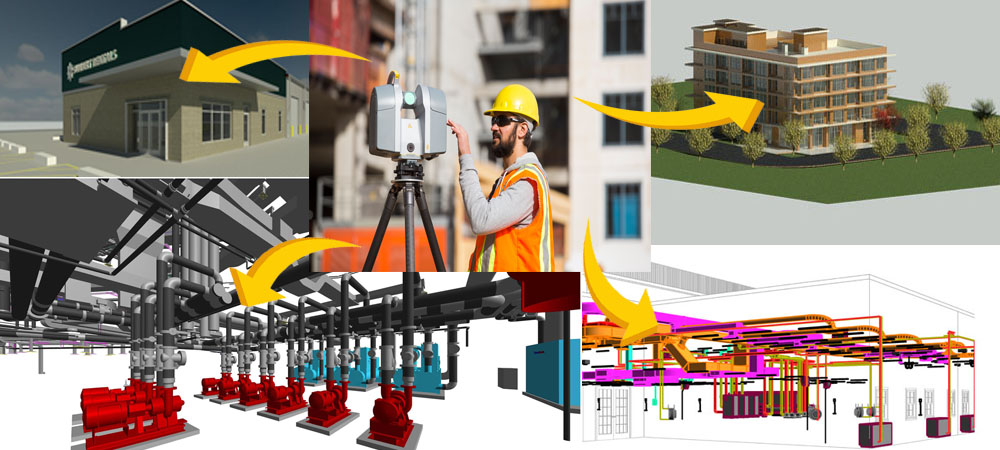
Scan to BIM (Scan to Building Information Modeling) is a transformative process that merges reality capture technologies with BIM workflows to produce accurate and data-rich digital representations of real-world structures. Utilizing 3D laser scanning or LiDAR technologies, this method captures as-built conditions with high precision and translates them into information-rich BIM models. Unlike traditional surveying methods, Scan to BIM provides not merely visualizations but actionable data models, which enable better decision-making throughout a structure’s lifecycle.
Reality Capture: The Foundation of Scan to BIM
The first step in the Scan to BIM process is capturing the real-world environment using 3D laser scanners (LiDAR) or photogrammetry. Laser scanners emit millions of laser pulses per second and measure their return time to create a point cloud. It’s a dense set of 3D coordinates that accurately represent surfaces and spaces. Alternatively, photogrammetry uses overlapping photographs captured via drones or handheld cameras, which are processed using specialized software to generate 3D models.
These methods offer several advantages. They are non-intrusive, allowing scanning without disrupting occupants or operations, and are highly precise, often capturing details down to millimetres. Complex geometries such as MEP systems, curved facades, and structural voids can be documented with ease, providing a comprehensive digital snapshot of the existing conditions.
Point Cloud Processing and Preparation
After data capture, the collected scans are processed into a clean, usable format. This involves several steps: aligning multiple scans through registration, filtering out noise, and segmenting the point cloud to distinguish architectural and structural components like walls, floors, beams, or piping systems.
Advanced software tools may be used to extract features from the point cloud, making it easier to trace and model these elements in BIM software. The goal of this phase is to prepare a navigable and accurate dataset that will serve as the basis for BIM modelling.
BIM Modeling from Point Cloud Data
The transformation from a raw point cloud to an actionable BIM model is where the true value of Scan to BIM lies. With the cleaned point cloud data in hand, professionals move into the BIM modeling phase using tools such as Autodesk Revit, Bentley MicroStation, or Graphisoft ArchiCAD. The point cloud is used as a reference, and BIM elements—walls, columns, floors, ducts, etc.—are manually or semi-automatically traced over it. The result is an as-built BIM model, which represents the real-world structure in both form and function.
Crucially, this model is not just a 3D geometry; it is embedded with metadata. For example, a duct segment can include material type, diameter, installation date, and maintenance history. The model can be created to varying Levels of Development (LOD) depending on project needs—from general layout (LOD 200) to highly detailed, fabrication-ready models (LOD 400 or LOD 500).
Applications of Scan to BIM
The utility of Scan to BIM extends across various domains. In renovation and retrofit projects, it eliminates the need for manual measurements and guesswork, providing a precise digital base model. In construction verification, the scanned as-built model can be compared with design intent to spot discrepancies early and avoid costly rework.
Another key application is clash detection, especially in MEP coordination. When integrating new HVAC or plumbing systems into old buildings, Scan to BIM ensures spatial compatibility. For facility management, the digital model can be integrated with CMMS (Computerized Maintenance Management Systems) or IWMS (Integrated Workplace Management Systems), streamlining operations and maintenance.
Even in heritage conservation, Scan to BIM plays a role by documenting historical structures in high detail, which can then be used for preservation, virtual tourism, or educational purposes.
Advantages Over Traditional Surveying
Traditional surveying methods rely heavily on 2D drawings and manual data collection, which are time-consuming, prone to error, and often lack spatial depth. In contrast, Scan to BIM offers a high-resolution, data-rich, and geometrically accurate environment that supports better planning and execution.
Benefits of Actionable Scan to BIM Models
- Design Validation and Clash Detection
BIM models created from real-world scans allow designers to validate proposed interventions against existing conditions. Software tools can identify clashes between new and existing systems, minimizing rework and construction delays.
- Construction Planning and Sequencing
With an accurate digital twin of existing conditions, contractors can plan construction phases more precisely. 4D BIM (time-based modeling) adds a temporal layer, showing how construction progresses in alignment with physical constraints.
- Quantity Take-offs and Cost Estimation
The actionable BIM model allows for automated quantity take-offs, reducing manual errors. Combined with 5D BIM, it links quantities to cost data, aiding in precise budgeting and tendering.
- Facility Management and Maintenance
Post-construction, owners and operators can use the model for Asset Information Management (AIM). Every component in the model can be linked to maintenance schedules, warranties, and performance data.
Real-World Example
Imagine a university hospital planning a retrofitting of its HVAC systems. Rather than relying on outdated blueprints or spending weeks measuring, engineers perform a 3D laser scan of the building. Within days, they have a full BIM model showing every duct, wall, and equipment in its actual position. The HVAC team designs the new system in Revit, runs clash detection against existing services, and generates fabrication drawings—all without a single on-site rework. Post-construction, the model is handed over to the maintenance department, who use it to schedule and monitor future repairs.
Contact Us
For a free quotation on your project requirements, feel free to contact us or email us at RAJ@SIMSONA.COM. Our experienced team is always ready and proud to support your project with precision and professionalism.

Send us
drawings and scope
Click the link below and send us your complete scope and drawings. We will provide quote/proposal in 24 to 48 hours.
FAQ’S
1. What is Scan to BIM?
Scan to BIM is the process of capturing real-world building data using laser scanning or photogrammetry and converting it into an intelligent 3D model using Building Information Modeling. It helps create accurate digital representations of existing structures.
2. How does the Scan to BIM process work?
The process involves 3D laser scanning to collect point cloud data, followed by processing and converting that data into a BIM model using software tools. The final model includes geometry and information about building elements.
3. What are the benefits of Scan to BIM?
Scan to BIM improves accuracy, reduces manual measurement errors, saves time, and provides reliable as-built documentation. It is especially useful for renovation, retrofitting, and facility management projects.
4. Which software is used for Scan to BIM?
Common tools include Autodesk ReCap, Autodesk Revit, and Navisworks, which help process point cloud data and create detailed BIM models.
5. Where is Scan to BIM commonly used?
Scan to BIM is widely used in renovation projects, heritage documentation, infrastructure upgrades, and facility management, where accurate existing condition data is essential.
 301-774-0880
