
Level of Detail || Level of Development in BIM Modeling || Simsona
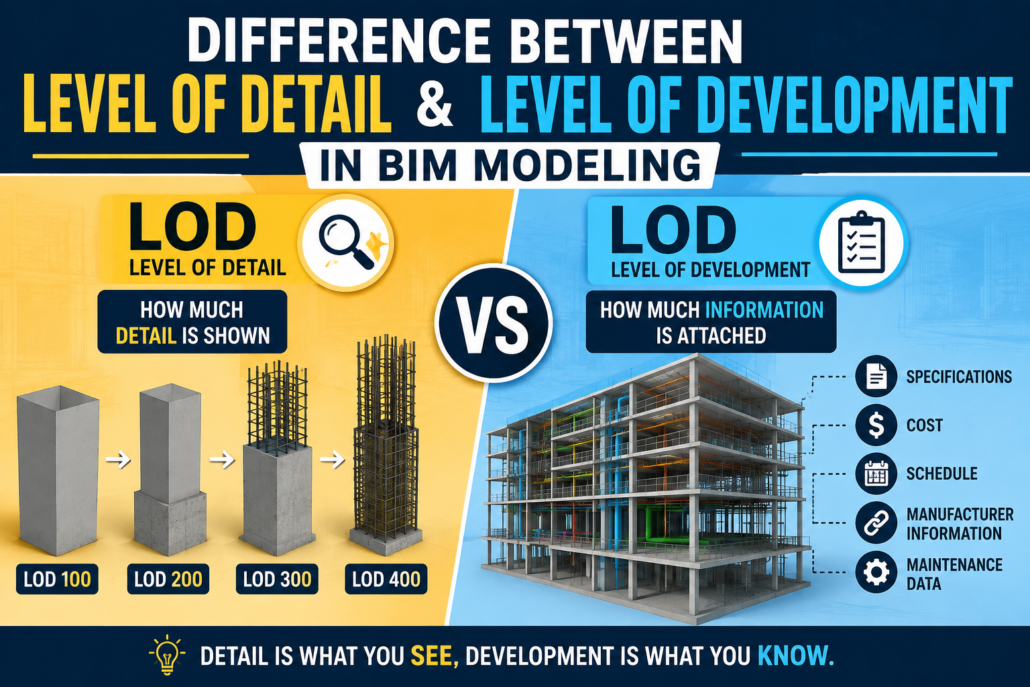
Building Information Modeling (BIM) has changed the way architects, engineers, contractors, and owners plan, design, construct, and manage buildings. As BIM models become more detailed throughout a project, it becomes important to understand exactly what that increasing detail represents.
Two terms that are often confused are Level of Detail (LOD) and Level of Development (LOD). Although they sound similar and are sometimes used interchangeably, they describe different aspects of a BIM model.
Level of Detail focuses primarily on how much graphical detail is included in a model element, while Level of Development focuses on how reliable, complete, and usable that element’s information and geometry are for a particular project stage.
Understanding this difference helps project teams establish realistic modeling expectations, avoid unnecessary modeling work, and ensure that BIM deliverables are suitable for their intended purpose.
What Is Level of Detail in BIM?
Level of Detail (Level of Detail) describes the amount of graphical or visual detail represented in a BIM model element.
In simple terms, it answers the question:
“How much detail can I see in the model?”
For example, consider a door in a BIM model.
At a low level of detail, the door may simply appear as a basic rectangular opening with a door panel. At a higher level of detail, the same door could include the frame, handles, hinges, glazing, seals, hardware, and other physical features.
Level of Detail is therefore closely associated with the visual representation and geometric complexity of an object.
Example of Level of Detail
Imagine modeling an air-handling unit (AHU).
At a basic level of detail, the AHU may appear as a simple rectangular box showing its approximate size.
At a higher level of detail, the model might show:
- Access panels.
- Fans.
- Coils.
- Filters.
- Connections.
- Control panels.
- Internal components.
- Mounting arrangements.
The model becomes increasingly visually detailed, but that does not automatically mean that all of the information has been developed or verified for construction.
This distinction is extremely important.
What Is Level of Development in BIM?
Level of Development (LOD) describes the degree to which a BIM element has been developed, coordinated, verified, and can be relied upon for a specific project use.
It answers a different question:
“How reliable and usable is this model element?”
Level of Development is therefore not simply about how realistic an object looks. It is about the extent to which the geometry and associated information have been developed to support project decisions and workflows.
For example, an architectural wall may be represented with considerable graphical detail but still not be sufficiently developed for fabrication.
Conversely, a relatively simple-looking model element may contain accurate dimensions, specifications, location information, manufacturer data, and other information required for a particular stage of the project.
Why Are Level of Detail and Level of Development Confused?
The confusion largely comes from the fact that both concepts involve the progression of BIM models from simple representations to more developed representations.
The abbreviation LOD has also historically been used for both Level of Detail and Level of Development.
However, they are not the same concept.
A useful way to remember the distinction is:
Level of Detail = How much you can see.
Level of Development = How much you can trust and use.
A highly detailed model does not necessarily represent a highly developed model.
Level of Detail vs Level of Development
The key differences can be summarized as follows:
| Aspect | Level of Detail | Level of Development |
|---|---|---|
| Primary focus | Graphical representation | Model reliability and usability |
| Main question | How much detail is shown? | How developed is the element? |
| Concerned with | Geometry and appearance | Geometry, information, coordination, and reliability |
| Typical purpose | Visualization and presentation | Design, coordination, construction, fabrication, or asset management |
| Information reliability | Not necessarily implied | Important consideration |
| Construction suitability | Cannot be assumed | Can be defined for specific uses |
| Example | Detailed door with handles and hinges | Door accurately developed for coordination or procurement |
| Project decision support | Limited by itself | Designed to support defined project decisions |
A Simple Example: BIM Door
Consider a door in an architectural BIM model.
Low Level of Detail
The door is represented by a simple rectangular panel.
It communicates:
- Approximate location
- Basic size
- Opening direction
The object is visually simple.
High Level of Detail
The door includes:
- Door leaf.
- Frame.
- Handles.
- Hinges.
- Glazing.
- Door closer.
- Threshold.
- Hardware.
Visually, the model is much more detailed.
However, the presence of these components does not automatically mean the door has been fully developed for construction.
Higher Level of Development
A developed door element could include reliable information such as:
- Verified dimensions.
- Door type.
- Material.
- Fire rating.
- Acoustic rating.
- Hardware requirements.
- Manufacturer information.
- Installation requirements.
- Coordination with adjacent elements.
The model may not need every tiny physical component to be useful.
This is the fundamental difference between detail and development.
Level of Detail Is Mainly About Geometry
Level of Detail generally deals with the graphical representation of model elements.
As the Level of Detail increases, objects generally become more visually complex.
For example:
Low detail:
A column may be represented as a simple rectangular or circular volume.
Medium detail:
The column may include its actual dimensions, shape, offsets, and connections.
High detail:
The column may show reinforcement, plates, bolts, welds, connection components, and other physical features.
However, adding all these components does not automatically make the model more useful.
In fact, excessive graphical detail can make a BIM model unnecessarily large and difficult to manage.
Level of Development Is About Purpose and Reliability
Level of Development is closely connected to project requirements and intended use.
A model element should be developed only to the extent necessary to support the required project activity.
For example, during early design, a structural column may only need approximate dimensions and location.
During detailed design, its size, material, structural properties, and relationship with other building elements may need to be established.
During construction, the element may need additional information for coordination, sequencing, procurement, or installation.
The model therefore becomes progressively more useful—not simply more visually complex.
Understanding LOD 100, 200, 300, 350, 400 and 500
In many BIM workflows, Level of Development is described using LOD stages such as LOD 100, 200, 300, 350, 400, and 500.
These levels are commonly used to communicate how developed a model element is at different stages of a project.
LOD 100 – Conceptual Representation
LOD 100 represents conceptual information.
Elements may be shown symbolically or approximately.
Typical uses include:
- Conceptual design.
- Early planning.
- Area studies.
- Massing.
- Preliminary cost analysis.
For example, a building may contain conceptual masses representing floors, zones, or major building systems.
The geometry is not intended to represent final construction information.
LOD 200 – Approximate Geometry
At LOD 200, elements are represented with approximate quantities, sizes, shapes, locations, and orientations.
The information is more developed than at LOD 100 but may still contain assumptions.
Typical uses include:
- Design development.
- Preliminary analysis.
- Space planning.
- Early coordination.
- Approximate quantity takeoffs.
For example, a mechanical duct may be modeled with an approximate size and route rather than final coordinated dimensions.
LOD 300 – Specific and Accurate Design
LOD 300 represents elements with sufficient geometric and information development to support detailed design documentation.
Elements generally have:
- Specific size.
- Specific shape.
- Specific location.
- Specific orientation.
- Appropriate design information.
LOD 300 can support tasks such as:
- Construction documentation.
- Detailed design.
- Quantity estimation.
- Design coordination.
At this stage, model elements are intended to represent the designed condition rather than simply an approximation.
LOD 350 – Construction Coordination
LOD 350 adds information necessary for coordination between building elements and systems.
This is particularly useful for construction coordination.
For example, an element may include relationships and interfaces with:
- Structural systems.
- Architectural elements.
- Mechanical systems.
- Electrical systems.
- Plumbing systems.
- Other construction components.
LOD 350 is particularly valuable when teams need to understand how different systems physically interact.
LOD 400 – Fabrication and Installation
LOD 400 represents a highly developed model suitable for fabrication, assembly, and installation-related activities.
Depending on the element and project requirements, the model may include:
- Fabrication-level geometry.
- Connections.
- Assembly information.
- Installation requirements.
- Manufacturer-specific information.
- Detailed dimensions.
For example, a structural steel model developed for fabrication may include detailed connections, plates, bolts, weld information, and other fabrication requirements.
LOD 500 – As-Built or Field-Verified Information
LOD 500 is generally associated with an element that represents the installed or existing condition and has been verified in the field.
It is often used for:
- Facility management
- Asset management.
- Operations and maintenance.
- Existing-condition documentation.
The important point is that LOD 500 is not simply “more detailed than LOD 400.”
Instead, it focuses on the verified status of the element.
A Common Misunderstanding: LOD 500 Does Not Mean Maximum Detail
One of the most common misconceptions in BIM is that LOD 500 means the most detailed possible model.
That is not necessarily true.
LOD 500 primarily relates to field-verified or as-constructed information, not an unlimited increase in graphical complexity.
For example, an installed pump does not need to be modeled down to every internal component simply because the project requires LOD 500.
The model should contain the information required for its intended operational or asset-management purpose.
Can a Model Have High Detail but Low Development?
Yes.
This is one of the most important concepts to understand.
Imagine a BIM family of a highly realistic toilet fixture.
The family contains:
- Detailed ceramic geometry.
- Internal components.
- Small fittings.
- Decorative features.
- Realistic materials.
It looks extremely accurate.
However, suppose the model does not contain:
- Verified dimensions.
- Correct connection locations.
- Manufacturer information.
- Required specifications.
- Installation information.
The object may have high graphical detail but limited development for construction purposes.
It looks impressive, but it may not be reliable enough to support the intended workflow.
Can a Model Have Lower Detail but Higher Development?
Yes.
Consider a simple equipment box representing a piece of mechanical equipment.
The geometry may be relatively basic, but the model could contain:
- Correct dimensions.
- Accurate location.
- Equipment identification.
- Manufacturer.
- Model number.
- Capacity.
- Service requirements.
- Connection information.
- Maintenance information.
For facility management, this model could be highly useful even though the geometry is not extremely detailed.
This demonstrates why visual complexity should not be confused with information maturity.
Level of Detail and Level of Development in Different Project Stages
The relationship becomes easier to understand when looking at a typical project lifecycle.
Conceptual Design
At the conceptual stage, teams generally need simple representations.
The focus may be on:
- Building massing.
- Areas.
- Volumes.
- Preliminary systems.
- General relationships.
High graphical detail is usually unnecessary.
Design Development
As the design progresses, model elements become more specific.
Teams may establish:
- Dimensions.
- Materials.
- Locations.
- System layouts.
- Design parameters.
The objective is to make the model useful for design decisions and coordination.
Construction Documentation
The model needs to represent the designed solution with sufficient accuracy to generate drawings, schedules, quantities, and other deliverables.
The emphasis is increasingly on reliable information and coordinated geometry.
Construction and Fabrication
Contractors, fabricators, and specialist subcontractors may require much more developed information.
Depending on project requirements, this can include:
- Fabrication geometry.
- Connections.
- Installation details.
- Shop drawing information.
- Sequencing information.
- Trade-specific requirements.
This is where high Level of Development becomes particularly important.
Operations and Facility Management
Once construction is complete, the model may be updated with verified information about installed assets.
The emphasis shifts toward:
- Asset identification.
- Equipment information.
- Maintenance requirements.
- Manufacturer information.
- Location.
- Operational data.
The model does not necessarily need maximum graphical detail.
Instead, it needs accurate and useful information.
How the Difference Affects BIM Modeling
Understanding the distinction can significantly improve BIM modeling workflows.
Without clear requirements, BIM teams may spend excessive time modeling unnecessary details.
For example, a BIM modeler may create detailed bolts, screws, brackets, and internal components that provide little value to the project’s intended use.
This can result in:
- Larger model sizes.
- Slower software performance.
- More complex coordination.
- Longer modeling time.
- Increased chances of errors.
- Difficult model management.
A well-defined Level of Development helps teams determine what information actually needs to be modeled.
Why Excessive Level of Detail Can Be a Problem
More detail is not always better.
A highly detailed model can create unnecessary computational and coordination requirements.
For example, modeling every screw in a large building can dramatically increase the number of model objects without providing meaningful project value.
Instead, BIM teams should ask:
Does this detail support a project requirement?
If the answer is no, it may not need to be modeled.
This approach is often described as modeling to purpose.
Level of Development and BIM Deliverables
BIM deliverables should clearly define what is expected from each discipline.
A BIM Execution Plan (BEP) can establish requirements such as:
- Required LOD for different project stages
- Model element responsibilities.
- Information requirements.
- Coordination requirements.
- Naming conventions.
- File exchange requirements.
- Model submission schedules.
- Approval procedures.
For example, an architectural team may be required to develop doors to a particular level for design coordination, while a specialist contractor may later develop the same doors further for procurement or installation.
This prevents different teams from making different assumptions about what “complete” means.
How LOD Helps BIM Coordination
LOD is particularly important in multidisciplinary BIM coordination.
Architectural, structural, mechanical, electrical, plumbing, and fire protection models often need to work together.
If one discipline models elements with significantly different expectations, coordination can become difficult.
For example, an MEP contractor may require accurately developed ductwork and equipment connections, while an architectural model may only contain simplified representations of certain components.
Clearly defining development requirements helps teams understand:
- What each model should contain.
- What information can be relied upon.
- What has not yet been developed.
- Which elements require further coordination.
This reduces misunderstandings during coordination meetings and clash detection.
Level of Detail vs Level of Development: Practical Example
Consider a ceiling-mounted air-conditioning unit.
Level of Detail Approach
The modeler focuses on making the equipment visually accurate.
The model might include:
- Casing.
- Grilles.
- Fans.
- Panels.
- Filters.
- Detailed internal components.
The result may look highly realistic.
Level of Development Approach
The modeler focuses on information required for the project’s current purpose.
The model may include:
- Correct equipment size.
- Accurate location.
- Service clearance.
- Duct connections.
- Electrical connection.
- Equipment identification.
- Manufacturer information.
- Installation requirements.
The second approach may produce a simpler-looking object but a much more useful BIM element.
The Role of Information in BIM
BIM is not simply 3D modeling.
A BIM model combines geometry with structured information.
That information may include:
- Dimensions.
- Materials.
- Specifications.
- Classification.
- Manufacturer data.
- Product information.
- Performance data.
- Installation information.
- Maintenance requirements.
- Asset information.
Therefore, evaluating a BIM model solely by its visual appearance can be misleading.
A model that looks highly detailed may still contain incomplete or unreliable information.
Level of Detail and Level of Development Should Work Together
Although the two concepts are different, they are closely related.
As a project progresses, graphical detail may increase alongside the development of information.
However, the two should not automatically increase at the same rate.
For example, a project may require a highly accurate equipment location and connection geometry while using a relatively simplified representation of the equipment itself.
The correct balance depends on the intended use of the model.
Best Practices for Managing Level of Detail and Level of Development
1. Define Requirements Early
Project teams should establish modeling requirements before significant modeling begins.
This prevents teams from making assumptions about what needs to be modeled.
2. Model According to Purpose
Every modeled component should have a reason for being modeled at a particular level.
Ask whether the geometry or information supports:
- Design.
- Coordination.
- Quantity takeoff.
- Fabrication.
- Installation.
- Construction.
- Facility management.
3. Avoid Unnecessary Geometry
Do not add small components simply because they make a model look realistic.
Unnecessary detail can increase file size and reduce performance.
4. Define Information Requirements
Geometric development is only one part of BIM.
Specify what non-graphical information is required for each element.
5. Use LOD Matrices
A project-specific LOD matrix can define the expected development of different elements at different stages.
For example:
| Element | Concept | Design | Coordination | Construction | FM |
|---|---|---|---|---|---|
| Walls | Basic | Defined | Coordinated | Verified | Asset-related data |
| Doors | Approximate | Specified | Coordinated | Installed | Product/maintenance data |
| Ductwork | Conceptual | Sized | Coordinated | Fabricated | System information |
| Equipment | Approximate | Specified | Connected | Installed | Asset information |
The exact requirements should always be established according to the project’s BIM standards and contractual requirements.
6. Coordinate Before Adding Detail
It is usually more valuable to establish accurate locations and relationships between systems before spending time on tiny graphical details.
A coordinated model with appropriate detail is generally more useful than a visually impressive but poorly coordinated model.
Common Mistakes to Avoid
Mistake 1: Assuming More Detail Means Higher LOD
A highly detailed object is not automatically highly developed.
Mistake 2: Using LOD as a Generic “Quality Score”
LOD should communicate what an element has been developed to support, not simply whether the model is good or bad.
Mistake 3: Modeling Everything
Not every physical component needs to be represented individually.
Mistake 4: Ignoring Non-Graphical Information
BIM is more than geometry. Information requirements are equally important.
Mistake 5: Treating LOD 500 as Maximum Detail
LOD 500 is associated with verified existing or installed conditions, not necessarily maximum graphical detail.
Level of Detail vs Level of Development: The Easiest Way to Remember
If you want to remember the difference quickly, use this simple comparison:
Level of Detail asks:
“How much can I see?”
Level of Development asks:
“How much has been developed and how reliable is it for the intended use?”
For example, a highly realistic chair may have a high Level of Detail, but if the chair’s manufacturer, specifications, location, and procurement information are missing, it may not be highly developed for a specific project purpose.
On the other hand, a simple equipment box with verified dimensions, manufacturer information, installation data, and asset information can be highly developed even though its graphical representation is relatively simple.
Conclusion
The difference between Level of Detail and Level of Development in BIM modeling is subtle but extremely important.
Level of Detail primarily describes the graphical complexity of a BIM element, while Level of Development describes the degree to which that element has been developed and can be relied upon for a particular project purpose.
A model should therefore not be judged simply by how realistic it looks.
Effective BIM modeling is about providing the right amount of geometry and information at the right stage of the project.
When project teams clearly distinguish between detail and development, they can reduce unnecessary modeling, improve model performance, strengthen coordination, and deliver BIM models that are genuinely useful for design, construction, fabrication, and facility management.
Ultimately, the goal of BIM is not to create the most detailed model possible. The goal is to create a model that contains the right information, at the right time, for the right purpose.
 301-774-0880