
BIM Is Not Just Revit: Difference Between Design and BIM
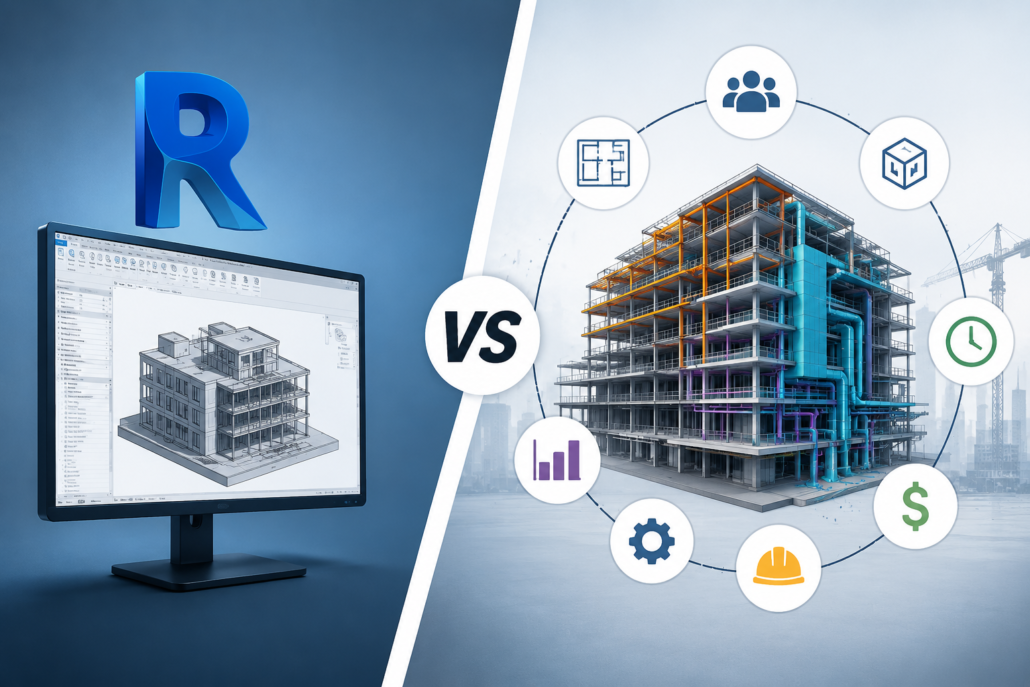
One of the biggest misconceptions in the architecture, engineering, and construction (AEC) industry is the belief that Building Information Modeling (BIM) is simply another name for Revit. It’s a misunderstanding that often leads to confusion among students, clients, and even professionals entering the industry.
Statements like “We need Revit drawings for BIM” or “We already use BIM because we work in Revit” are heard frequently. While Revit is undoubtedly one of the most powerful BIM software platforms available today, BIM is much more than a software application. It is a collaborative process, a methodology, and a data-driven approach to designing, constructing, and managing buildings throughout their lifecycle.
Understanding the distinction between design software and BIM processes is essential for architects, engineers, contractors, developers, and facility managers. This article explains what BIM truly is, how it differs from traditional design, why Revit is only one component of BIM, and how organizations can fully benefit from adopting BIM methodologies.
What Is BIM?
Building Information Modeling (BIM) is a digital process for creating, managing, and sharing information about a built asset throughout its entire lifecycle—from concept and design to construction, operation, maintenance, renovation, and even demolition.
Unlike traditional CAD drafting, BIM creates an intelligent digital representation of a building where every element contains information, not just geometry.
A BIM model includes:
- Architectural components.
- Structural systems.
- Mechanical systems.
- Electrical systems.
- Plumbing systems
- Material specifications.
- Product manufacturers.
- Cost information.
- Construction sequencing.
- Maintenance data.
- Performance information.
In simple terms, BIM combines 3D geometry with intelligent data, enabling every stakeholder to work from the same source of information.
What Is Revit?
Revit is a software application developed by Autodesk for creating intelligent 3D building models.
It enables professionals to:
- Design buildings.
- Produce construction documentation.
- Generate schedules.
- Coordinate disciplines.
- Create parametric families.
- Perform quantity take-offs.
Revit is one of the most widely used BIM-authoring tools in the world, but it is still only a tool.
Just as Microsoft Word is not the same as writing, Revit is not the same as BIM.
Design vs BIM: Understanding the Core Difference
Traditional design focuses primarily on creating drawings and communicating design intent. BIM, on the other hand, focuses on creating a coordinated digital information model that supports the entire project lifecycle.
Traditional design typically answers questions such as:
- What does the building look like?
- How should it be built?
- What dimensions should contractors follow?
BIM goes much further by answering questions like:
- What materials are used?
- Who manufactures each component?
- How much will it cost?
- When should it be installed?
- How will it perform?
- How should it be maintained?
- What happens when it is replaced?
In other words, design is one phase of a project, while BIM manages information throughout the entire project lifecycle.
Why People Think BIM Means Revit
There are several reasons why the misconception exists.
Revit Popularized BIM
Revit became one of the first mainstream software platforms capable of producing intelligent building models. As its popularity grew, many professionals began using the terms Revit and BIM interchangeably.
Training Often Focuses on Software
Many courses teach students how to use Revit tools without explaining BIM standards, collaboration workflows, information management, or project delivery methods.
As a result, many professionals become proficient in Revit but never learn what BIM actually involves.
Clients Often Request “BIM Models”
Sometimes, clients request BIM but simply expect a Revit file, even though true BIM deliverables include coordinated information, documentation standards, and structured project data.
BIM Is a Process, Not a Software
Perhaps the simplest way to understand BIM is this:
Software enables BIM, but software alone is not BIM.
Many software platforms support BIM workflows, including:
- Autodesk Revit.
- Navisworks.
- Civil 3D.
- Tekla Structures.
- Archicad.
- Bentley OpenBuildings.
- Vectorworks Architect.
- Solibri.
- Synchro.
- Autodesk Construction Cloud.
Each serves a different purpose, from modeling and clash detection to construction sequencing, model validation, and facility management.
Together, these tools support a BIM process—but none of them individually is BIM.
Traditional CAD Workflow vs BIM Workflow
In a traditional CAD workflow, architects, structural engineers, and MEP consultants often create separate drawings with limited coordination. Any design change usually requires manual updates across multiple drawings, increasing the risk of inconsistencies.
In a BIM workflow, all disciplines develop coordinated intelligent models. Changes made to the model automatically update related plans, elevations, sections, schedules, and quantities. Coordination improves significantly because every stakeholder works with connected project information rather than isolated drawings.
The result is fewer errors, faster revisions, and better collaboration throughout the project.
BIM Is About Collaboration
One of BIM’s greatest strengths is collaborative working.
Instead of multiple disconnected teams producing separate documents, BIM enables everyone to work from coordinated information.
Stakeholders include:
- Architects.
- Structural engineers.
- MEP engineers.
- Contractors.
- Fabricators.
- Quantity surveyors.
- Project managers.
- Facility managers.
- Owners.
Everyone contributes information that becomes part of a shared digital asset.
This collaborative environment reduces misunderstandings, improves communication, and minimizes project risks.
BIM Goes Beyond 3D Models
Many people assume BIM simply means creating a 3D model.
In reality, BIM extends into multiple dimensions.
3D BIM
Geometric representation of the building.
4D BIM
Construction scheduling linked to model elements.
5D BIM
Cost estimation and budgeting integrated with the model.
6D BIM
Sustainability analysis, energy performance, and lifecycle assessment.
7D BIM
Facility management, maintenance planning, and asset management.
These additional dimensions demonstrate that BIM is an information management process rather than just a modeling technique.
Can You Use Revit Without Doing BIM?
Yes.
Many organizations use Revit merely as a drafting tool.
Common examples include:
- Creating 3D models solely for visualization.
- Producing construction drawings without coordination.
- Ignoring BIM standards.
- Not sharing models between disciplines.
- Excluding metadata from model elements.
- Delivering only PDF drawings to clients.
In these cases, the organization is using Revit software but not fully implementing BIM.
Can BIM Exist Without Revit?
Absolutely.
Several organizations successfully implement BIM using other authoring tools such as Archicad, Tekla Structures, Bentley OpenBuildings, or Open BIM workflows based on Industry Foundation Classes (IFC).
The BIM methodology remains the same regardless of the software used.
This is why many government projects worldwide encourage or require open standards rather than dependence on a single software platform.
Key Components of a Successful BIM Process
A mature BIM implementation involves much more than creating models.
Successful BIM projects typically include:
- BIM Execution Plans (BEP).
- Employer’s Information Requirements (EIR).
- Common Data Environment (CDE).
- Naming conventions.
- Model coordination.
- Clash detection.
- Information exchange standards.
- Level of Information Need.
- Quality assurance procedures.
- Model validation.
- Asset information management.
- Digital handover documentation.
These processes ensure that information remains reliable, consistent, and useful throughout the project’s lifecycle.
Benefits of Implementing True BIM
Organizations that embrace BIM as a process rather than simply using modeling software gain significant advantages.
These include:
- Improved collaboration across disciplines.
- Better design coordination.
- Early clash detection.
- Reduced rework during construction.
- Faster project delivery.
- More accurate quantity take-offs.
- Better cost control.
- Enhanced project visualization.
- Improved communication with clients.
- More efficient facility management.
- Higher-quality project documentation.
- Better lifecycle asset management.
These benefits often translate into reduced project risk and long-term operational savings.
Common Myths About BIM
Myth 1: BIM Is Just Revit
Reality: Revit is one BIM-authoring tool. BIM is the overall process.
Myth 2: BIM Is Only 3D Modeling
Reality: BIM also includes information management, collaboration, scheduling, costing, and asset management.
Myth 3: BIM Is Only for Architects
Reality: BIM supports architects, engineers, contractors, owners, facility managers, and many other stakeholders.
Myth 4: BIM Ends After Construction
Reality: One of BIM’s greatest values is supporting building operations and maintenance long after construction is complete.
Myth 5: Learning Revit Means You Know BIM
Reality: Revit skills are valuable, but BIM also requires knowledge of standards, workflows, coordination, collaboration, and information management.
The Future of BIM
As digital construction continues to evolve, BIM is becoming the foundation for technologies such as Digital Twins, Artificial Intelligence, IoT-enabled smart buildings, robotics, reality capture, and cloud-based collaboration.
Future projects will increasingly rely on integrated information rather than isolated drawings. Professionals who understand BIM principles—not just software commands—will be better prepared for this transformation.
Conclusion
Revit has transformed the way buildings are modeled and documented, but it is important to recognize that Revit is a tool, while BIM is a comprehensive process. Confusing the two can limit the value organizations gain from digital construction.
True BIM is about creating reliable information, enabling collaboration, improving coordination, reducing project risks, and supporting the entire lifecycle of a building. Software like Revit plays a crucial role in this process, but successful BIM implementation also depends on standards, workflows, communication, and effective information management.
 301-774-0880